How to Study for Exams Using AI: Tools, Prompts & Tips

If you’re nearing a final, you might be experiencing that sinking feeling as you realize you are facing hundreds of pages of reading you never got to, three lectures you missed, and those flashcards you keep meaning to make. AI is the obvious solution here, yet many students find themselves down a GPT rabbit hole every time they sit down to get organized.
Studying with AI has its upsides and downsides. Yes, the tools are powerful, but they don’t come with pre-built workflows or systems to guide you. To save you some time and energy, we have created a playbook for studying with AI.
AI won't replace the work of actual learning. It can, however, save you the time you'd otherwise spend organizing and distilling important information. If you use it well, an AI-assisted study workflow can compress days of prep into hours.
This guide walks you through the best way to study for exams using AI: the workflow that actually works, the tools worth knowing, and the prompts you can copy and use tonight.
TL;DR
- The best AI workflow keeps you in the driver's seat and uses AI for the grunt work like planning, concept explanation, practice, and flashcard generation.on
- General-purpose chatbots like ChatGPT and Claude are useful for explaining concepts and creating practice questions.
- More tailor- made tools like RemNote are useful for turning your lectures, PDFs, and notes into flashcards and review schedules automatically.
- AI can make you feel productive,ive but it can’t do the studying for you. The actual learning is still up to you.
The Ideal AI Study Workflow
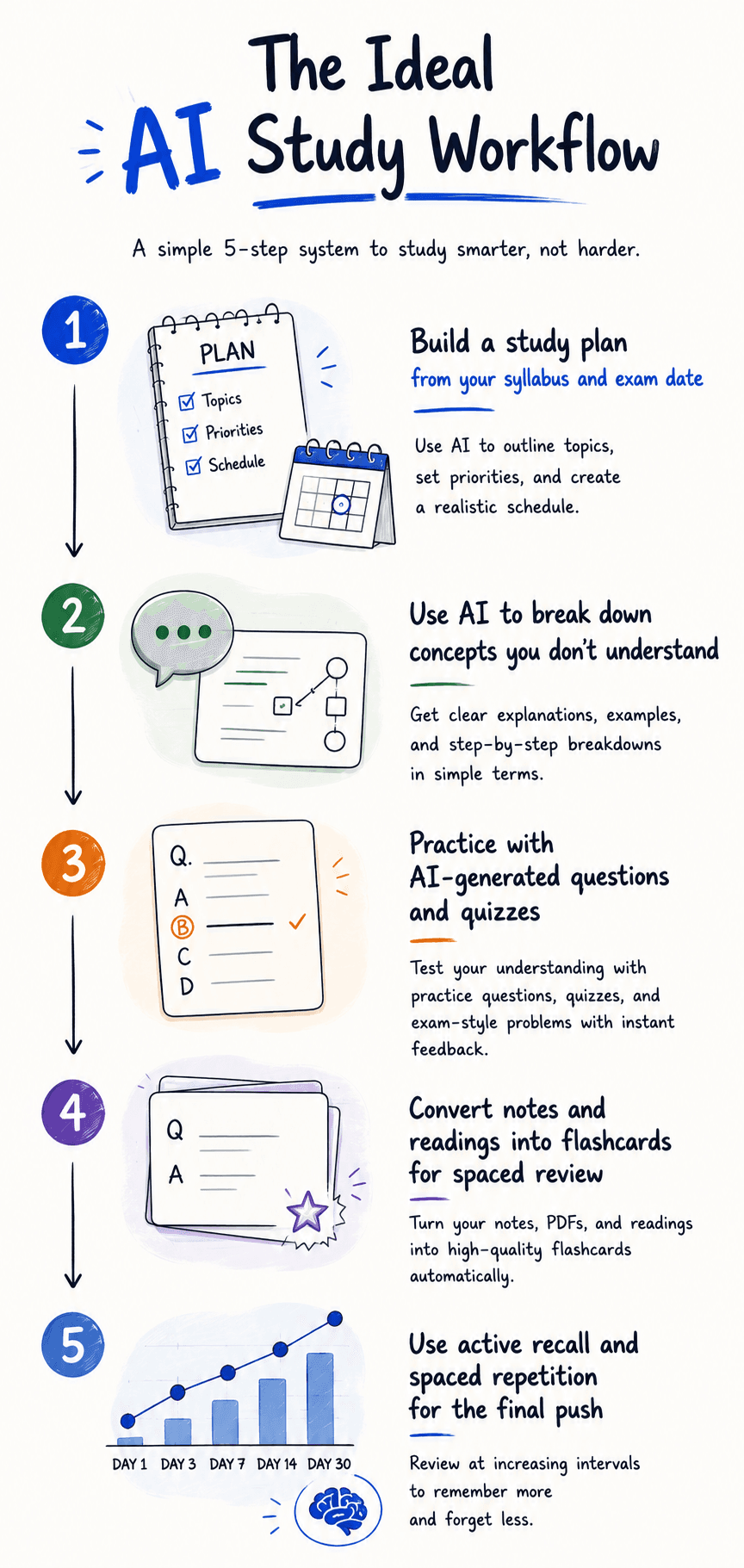
Before diving into tools and prompts, here's the workflow at a glance:
Step 1: Build a Study Plan
If you want your test prep to go as smoothly as possible and stand the highest chance of succeeding, you’re going to want to go in with a plan. AI is of great help when it comes to creating study plans. You can feed it your exam date, syllabus, and any digital notes and PDFs, and it can help you create a realistic schedule.
Ask your AI tool of choice to build you a daily plan that works backwards from the exam date. You can layer in your schedule and other specifics to get a tailored study plan. Even if you stick to 80% of your plan, you will see success.
Step 2: Understand Difficult Concepts
Have you ever faced a paragraph that you’ve had to read over and over again, and you still couldn’t quite get what is happening? We’ve all been there, and it just so happens that AI shines at this capability. You can frame your questions like “explain this to me like I’m in grade 7” or keep it conversational and treat the tool like your brainstorming partner.
Sometimes open LLM tools aren’t targeted enough to extract the information you need. More and more students are relying on specialized tools to draw material trapped in dense sources.
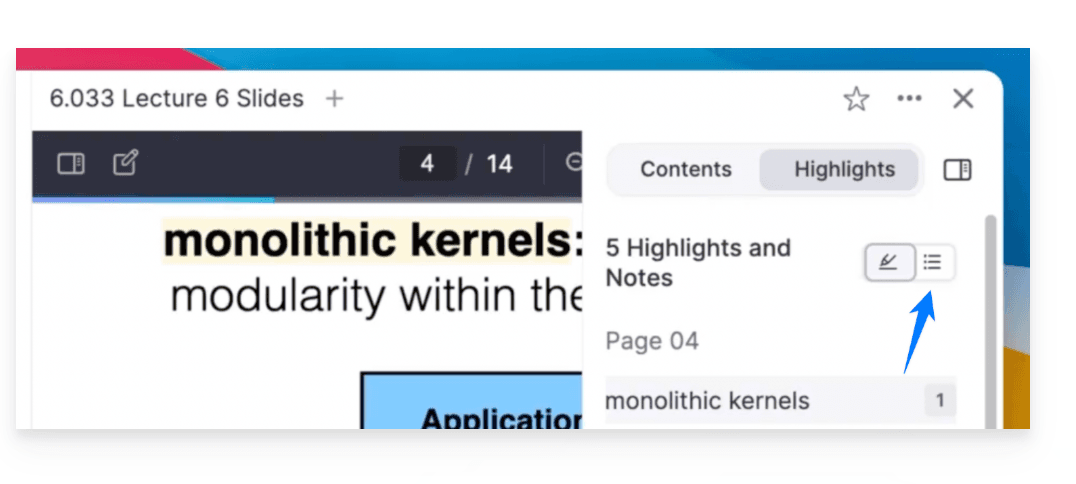
One of the most popular use cases is PDF annotation, which lets you highlight and question a reading while you're in it.
PPT annotation does the same for lecture slides, so you can add commentary directly onto the material instead of switching between windows. If you missed a lecture entirely, an AI note taker can generate structured notes from a recording so you're not stuck watching hours of playback.
Step 3: Practice With AI
Going over the same material repeatedly loses its efficacy after a while and stops building memory. To combat this, you have to integrate active recall into your practice strategy.
Feed AI your notes or a source document, and ask it to generate practice questions in the format of your exam (multiple choice, short answer, essay prompts, worked problems). Then answer them without looking, and only check afterward.
Preparing in this way will take away the nerves on exam day and help you simulate an accurate practice exam.
Step 4: Create Flashcards and Practice Questions
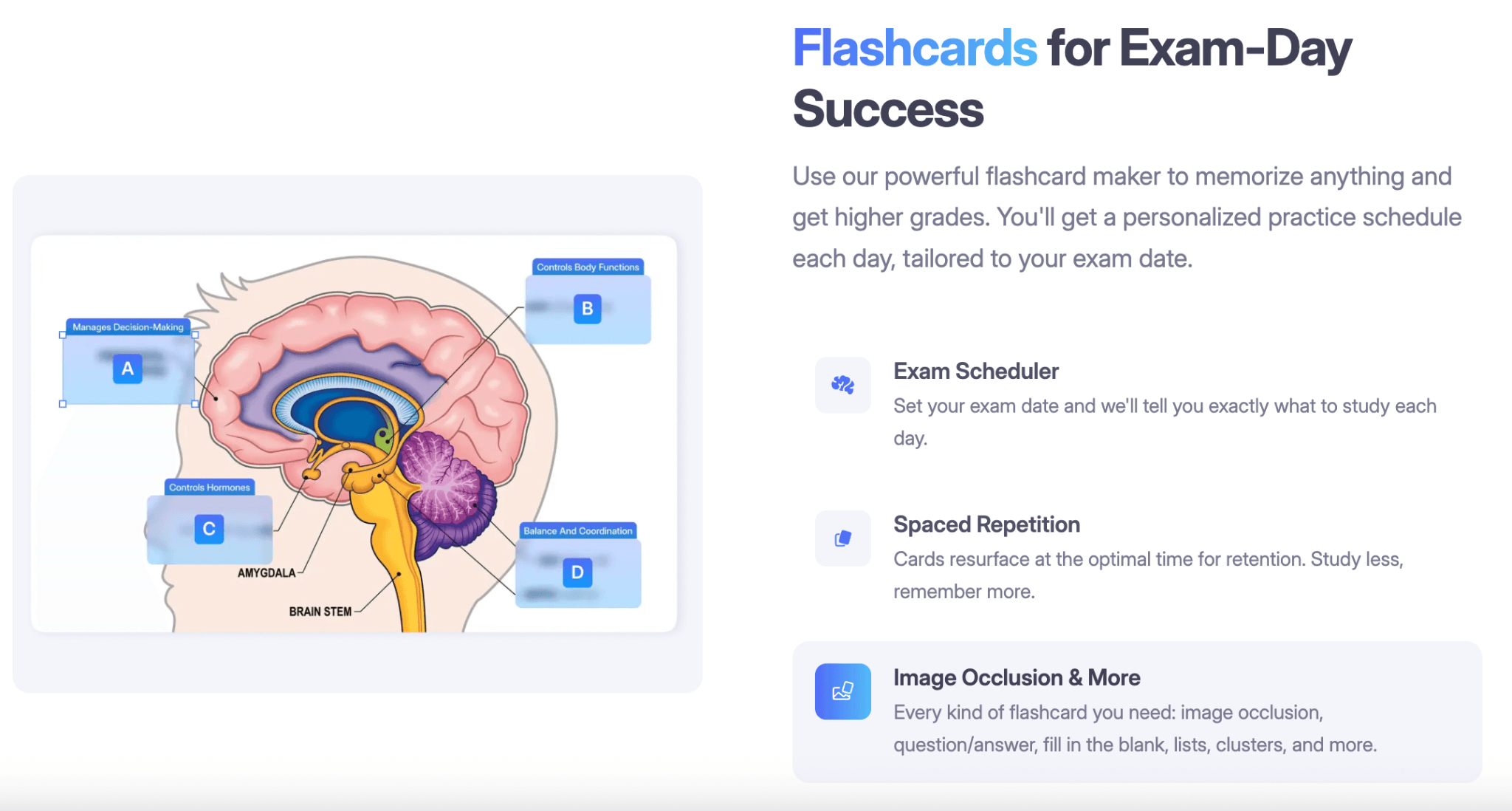
Flashcards are still one of the best ways to study for anything that requires memorization. You just can’t beat the format, and now with AI tools added to the mix, the results are even more powerful.
Instead of spending hours writing cards by hand, use AI to generate a full deck from your notes or a PDF in minutes.
Tools like PDF to flashcards turn entire textbook chapters into study decks. You can also create study flashcards directly from your own notes as you take them, and create flashcards with AI assistance inside the same tool where you review them. If you'd rather start with something existing, pre-built study decks cover most common university subjects.
Step 5: Review With Spaced Repetition
Once you have your flashcard deck ready, you will want to explore which review method is best for you. Spaced repetition works because it schedules reviews right before you would forget, which is when review is most efficient. Any modern study tool worth using should have spaced repetition baked in.
AI Tools and Their Role
There's no single best AI tool for studying. Different tools do different things well.
ChatGPT (OpenAI)
Strong all-purpose assistant. Great for explaining concepts, generating practice questions, drafting summaries, and brainstorming study plans. Its main limitation for studying is that it lives outside your notes, so you're constantly copying material back and forth.
Claude (Anthropic)
Similar general-purpose strengths. Often better at working with long documents, which makes it useful when you're feeding it entire chapters or lecture transcripts. Same workflow limitation as ChatGPT: it doesn't live inside your study material.
RemNote
Built specifically for studying. Combines note-taking, AI-assisted flashcard generation, and spaced repetition in one place. The AI flashcard generator turns documents and notes into decks automatically, and reviews happen inside the same tool where the notes live. Useful when you want a full study workflow rather than an all-purpose assistant.
If you're comparing options, our roundups of the best flashcard makers and the best Quizlet alternatives cover the major tools side by side.
Copy these AI Prompts
Paste them into whichever tool you're using to help you get started.
To build a study plan:
I have an exam on [date] covering [topics]. Here is my syllabus: [paste]. Build a day-by-day study plan working backward from the exam date, spending more time on topics I mark as weaker.
To explain a complex topic:
Explain [concept] to me in three different ways: first with a simple analogy, second with a worked example, and third by connecting it to [something you already understand].
To practice test questions:
Here are my notes on [topic]. Generate 10 practice questions in the format of my exam: [multiple- choice / short- answer/essay / worked problems]. Include answers separately at the end.
To make flashcards:
From these notes, generate flashcards in the format "front: question, back: answer." Keep each card to one idea, and make questions specific enough that the answer isn't obvious from the question alone.
To summarize for an exam:
Summarize this chapter into a one-page study guide, focused on the concepts most likely to appear on an exam. Include key terms, formulas or frameworks, and the two or three most important takeaways.
FAQs
Is ChatGPT good for exam preparation?
AI chatbots like ChatGPT can be especially useful for exam preparation when used the right way. Use it to explain concepts, generate practice questions, and draft study plans.
What is the best AI tool for exam preparation?
There’s no single tool that can be called “the best” in this situation. General-purpose AI like ChatGPT and Claude are strongest for concept explanation and question generation.
Study-specific tools like RemNote are strongest for turning material into flashcards and running spaced-repetition reviews. Most students who study effectively with AI use a combination.
Is it okay to use AI for exam prep?
Using AI to help you study is generally fine, and increasingly encouraged by universities. Using AI to write the exam for you is not. The line between the two is usually clear: if you're building your own understanding of the material, AI is a study partner. If you're outsourcing your thinking, you're not actually studying.